
-
-
Save whiteinge/4429633 to your computer and use it in GitHub Desktop.
| <TaskerData sr="" dvi="1" tv="1.3.3u2m"> | |
| <Task sr="task2"> | |
| <cdate>1345254133188</cdate> | |
| <edate>1357068354779</edate> | |
| <id>2</id> | |
| <nme>Headed Home</nme> | |
| <pri>10</pri> | |
| <Action sr="act0" ve="3"> | |
| <code>902</code> | |
| <Int sr="arg0" val="0"/> | |
| <Int sr="arg1" val="100"/> | |
| <Int sr="arg2" val="0"/> | |
| <Int sr="arg3" val="0"/> | |
| </Action> | |
| <Action sr="act1" ve="3"> | |
| <code>118</code> | |
| <Str sr="arg0" ve="3">maps.googleapis.com</Str> | |
| <Str sr="arg1" ve="3">maps/api/directions/json</Str> | |
| <Str sr="arg2" ve="3">origin=%LOC | |
| destination=%HOME | |
| sensor=false</Str> | |
| <Str sr="arg3" ve="3"/> | |
| <Int sr="arg4" val="10"/> | |
| <Str sr="arg5" ve="3">text/plain</Str> | |
| <Str sr="arg6" ve="3"/> | |
| </Action> | |
| <Action sr="act2" ve="3"> | |
| <code>129</code> | |
| <lhs>%HTTPL</lhs> | |
| <op>4</op> | |
| <rhs>0</rhs> | |
| <Str sr="arg0" ve="3">var t = JSON.parse(global('HTTPD')); | |
| var dur = t.routes[0].legs[0].duration.text; | |
| var dist = t.routes[0].legs[0].distance.text; | |
| var msg = "I'm in the car. Headed home."; | |
| if (dist) msg += " I'm " + dist + " away."; | |
| if (dur) msg += " With an estimated " + dur + " driving time (not accounting for traffic)."; | |
| var ok = sendSMS(global('HOMENUM'), msg); | |
| flashLong("Sent message: " + msg);</Str> | |
| <Str sr="arg1" ve="3"/> | |
| <Int sr="arg2" val="1"/> | |
| <Int sr="arg3" val="45"/> | |
| </Action> | |
| </Task> | |
| </TaskerData> |


For anyone who comes across this and doesn't know how to import it, I'll go over the steps:
- Download the XML file to your phone. It should be named "headed-home.xml".
- Rename the file to "headed-home.tsk.xml".
- Go into Tasker and long-press the "Task" tab at the top of the screen and select "Import".
- Navigate to where the XML file is located and select it. That should import the task.

This isn't working for me anymore. Not sure when it stopped. Could be a Tasker update that killed it. Is it still working for you? I am on the beta 5.0b2. The task completes with no variables being updated and no message going out. I have my cell number in %HOMENUM using 7 digits. My %HOME is my address and I have tried using "+" in all the spaces, I've tried it with regular spaces, I've tried the Lat/Long. Check this thread where I have shared your work with other Tasker users, including the Dev of Tasker. https://groups.google.com/forum/#!topic/tasker/R8hexexzPvM
Also note in that thread that I mentioned that I changed line 43 to be "%" before the HOMENUM so it would reference the variable.

I created both test variables accordingly, but it does not work. No errors are returned but nothing happens. Any ideas?

@duckredbeard It isn't necessary to use a % symbol in the global() function, it's optional.

I'm getting an auth error.
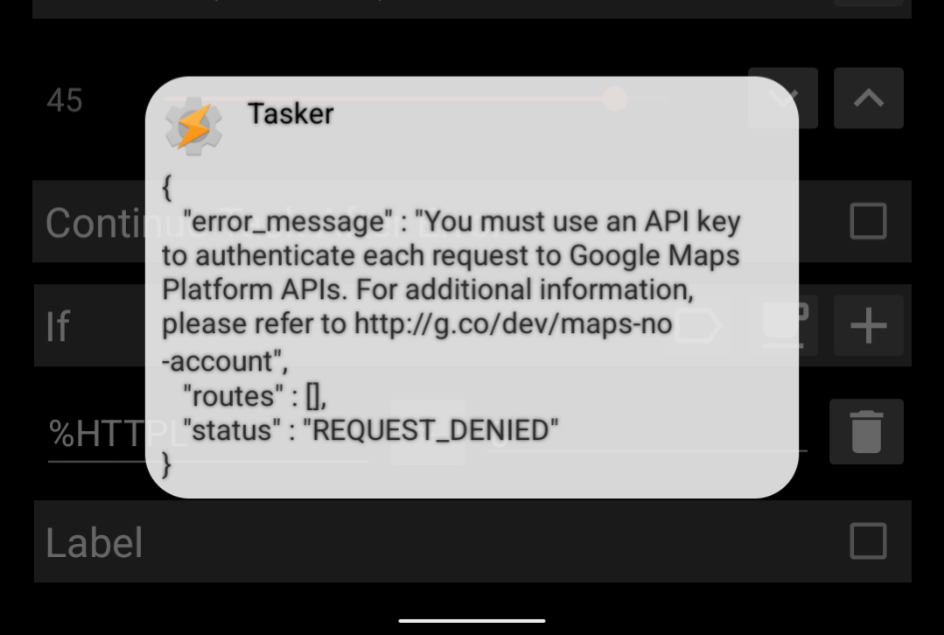

It's also not working for me. Has anyone managed to get this working again or found an alternative?
How can I import it?