Skip to content

Instantly share code, notes, and snippets.

@eli9000
Last active December 24, 2024 13:53
Show Gist options
  • Select an option

  • Save eli9000/ac3356bb2d40183be1a425805e3b7641 to your computer and use it in GitHub Desktop.

Select an option

Save eli9000/ac3356bb2d40183be1a425805e3b7641 to your computer and use it in GitHub Desktop.
Change your Raspberry Pi scrolling to Natural Scrolling - NEW Bookworm hack!

Bookworm OS (Debian 12)

While this method is indeed a bit hacky, it does work! Perhaps in due course wayfire will make this a bit more straight forward...

🚨 🚨 For some reason wayfire will (occasionally) add back in the <min>0.0</min> line and will also remove the <max>1.0</max> (see Step 2. If you notice natural scroll not working, this is most likely the cause. Just repeat this step and sudo reboot... hey I said it was hacky 🤷🏻‍♂️

Step 1

vi ~/.config/wayfire.ini

After the [input] section add mouse_scroll_speed=-1.0 (negative 1)

bookworm-wayfire-ini

Step 2

sudo vi /usr/share/wayfire/metadata/input.xml

Delete line 112 <min>0.0</min> from the mouse_scroll_speed section

bookworm-input-xml

Step 3

Restart Pi and enjoy that natrually scrolling goodness!


VNC Viewer Issue

I've observed that while connected via VNC Viewer, the scroll direction is reversed... again. I haven't figured out how to resolve this minor annoyance, but when I do I'll update the gist. I'm guessing there is an option somewhere in the Expert tab when viewing the connection properties. If YOU know of a fix, please enlighten me 😁
Bullseye OS (Debian 11)

gsettings set org.gnome.desktop.peripherals.mouse natural-scroll true

Thanks @makouski for this 🙌🏻

Older OS (Debian 10 or below?)

Via the Terminal, type

cd /usr/share/X11/xorg.conf.d
sudo nano 40-libinput.conf

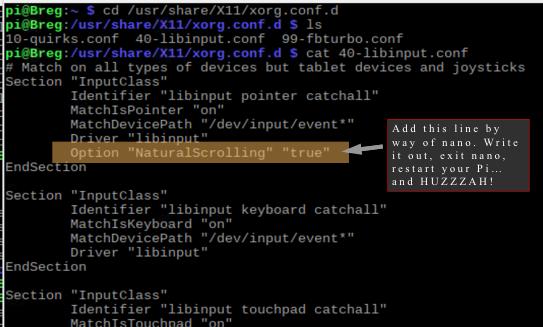
Add to following line to the BOTTOM of the FIRST Section "InputClass"

Option "NaturalScrolling" "true"

Here is a visual representation

Nice work braaaaah

Once you're finished, write to the file and then exit.

Restart your Pi

Enjoy that natural scrolling goodness!

Cheers

ghost commented Apr 21, 2021

Copy link
Copy Markdown

Thanks a lot, works great.

@frenchfaso

Copy link
Copy Markdown

Seems not to work anymore with the latest Raspberry Pi OS (bullseye)

@FancyChancie

Copy link
Copy Markdown

Thank you so much @eli9000, my frustration level has lowered... "not all zeros wear capes."

@frenchfaso, this worked just fine for me using bullseye.

@makouski

makouski commented Mar 6, 2022

Copy link
Copy Markdown

@frenchfaso, I have the same problem: updating 40-libinput.conf did not work in bullseye but it did work in buster.
this is how I enabled natural scrolling in bullseye:
gsettings set org.gnome.desktop.peripherals.mouse natural-scroll true

@arsenyturin

Copy link
Copy Markdown

@makouski Thank you good sir! It worked

@max-aigner

Copy link
Copy Markdown

@makouski thanks for posting, worked for me in bullseye as well

@tjf9000

tjf9000 commented Mar 19, 2023

Copy link
Copy Markdown

@makouski Thank you! Worked for me in Bullseye, no reboot necessary.

@bzareba

bzareba commented Apr 2, 2023

Copy link
Copy Markdown

@eli9000 Hi, maybe it's worth to update doc with the script for Bullseye given by @frenchfaso ? This is the first google result for raspberry pi natural scrolling :)

@frenchfaso, I have the same problem: updating 40-libinput.conf did not work in bullseye but it did work in buster. this is how I enabled natural scrolling in bullseye: gsettings set org.gnome.desktop.peripherals.mouse natural-scroll true

@eli9000

eli9000 commented Apr 11, 2023

Copy link
Copy Markdown
Author

@bzareba good idea, I will do so!

@eli9000

eli9000 commented Feb 22, 2024

Copy link
Copy Markdown
Author

Updated added for Bookworm (Debian 12) 🥳

See bookworm.md

Sign up for free to join this conversation on GitHub. Already have an account? Sign in to comment