
Created
October 8, 2020 10:45
-
-
Save shameerahamed/5fcf545625bd52cc2bf878de7c2a18bd to your computer and use it in GitHub Desktop.
Scriptable script - Home page widget
This file contains bidirectional Unicode text that may be interpreted or compiled differently than what appears below. To review, open the file in an editor that reveals hidden Unicode characters.
Learn more about bidirectional Unicode characters
| // Variables used by Scriptable. | |
| // These must be at the very top of the file. Do not edit. | |
| // icon-color: orange; icon-glyph: magic; | |
| // Variables used by Scriptable. | |
| // These must be at the very top of the file. Do not edit. | |
| // icon-color: deep-brown icon-glyph: magic | |
| // Variables used by Scriptable. | |
| // These must be at the very top of the file. Do not edit. | |
| // icon-color: red icon-glyph: magic | |
| // Variables used by Scriptable. | |
| // These must be at the very top of the file. Do not edit. | |
| // icon-color: deep-purple icon-glyph: magic | |
| // Variables used by Scriptable. | |
| // These must be at the very top of the file. Do not edit. | |
| // icon-color: light-gray icon-glyph: magic | |
| // To use, add a parameter to the widget with a format of: image.png|padding-top|text-color | |
| // The image should be placed in the iCloud Scriptable folder (case-sensitive). | |
| // The padding-top spacing parameter moves the text down by a set amount. | |
| // The text color parameter should be a hex value. | |
| // For example, to use the image bkg_fall.PNG with a padding of 40 and a text color of red, | |
| // the parameter should be typed as: bkg_fall.png|30|#ff0000|name | |
| // All parameters are required and separated with "|" | |
| // Parameters allow different settings for multiple widget instances. | |
| let backgroundColor = "#ffffff" | |
| let currentDayColor = "#0FB5EE" | |
| let textColor = "#ffffff" | |
| // opacity value for weekends and times | |
| const opacity = 0.7 | |
| var dark = Device.isUsingDarkAppearance() | |
| if (dark) { | |
| backgroundColor = "#1C1C1E" | |
| currentDayColor = "#EB6E4E" | |
| textColor = "#ffffcc" | |
| } | |
| var today = new Date() | |
| var widgetInputRAW = args.widgetParameter | |
| try { | |
| widgetInputRAW.toString() | |
| } catch(e) { | |
| if (config.runsInWidget) | |
| throw new Error("Please long press the widget and add a parameter.") | |
| else | |
| widgetInputRAW = "pics/IMG6.jpg|30|#ffffff|Shameer" | |
| } | |
| var widgetInput = widgetInputRAW.toString() | |
| var inputArr = widgetInput.split("|") | |
| // iCloud file path | |
| var fm = FileManager.iCloud() | |
| var scriptableFilePath = "/var/mobile/Library/Mobile Documents/iCloud~dk~simonbs~Scriptable/Documents/" | |
| // var scriptableFilePath = fm.documentsDirectory() | |
| log(scriptableFilePath) | |
| var removeSpaces1 = inputArr[0].split(" ") // Remove spaces from file name | |
| var removeSpaces2 = removeSpaces1.join('') | |
| var tempPath = removeSpaces2.split(".") | |
| var backgroundImageURLRAW = scriptableFilePath + tempPath[0] | |
| var backgroundImageURL = scriptableFilePath + tempPath[0] + "." | |
| if(Device.isUsingDarkAppearance()) { | |
| log("dark") | |
| removeSpaces2 += "-dark" | |
| } | |
| var backgroundImageURLInput = scriptableFilePath + removeSpaces2 | |
| log(backgroundImageURLInput) | |
| // For users having trouble with extensions | |
| // Uses user-input file path is the file is found | |
| // Checks for common file format extensions if the file is not found | |
| if (fm.fileExists(backgroundImageURLInput) == false) { | |
| var fileTypes = ['png', 'jpg', 'jpeg', 'tiff', 'webp', 'gif'] | |
| fileTypes.forEach(function(item) { | |
| if (fm.fileExists((backgroundImageURL + item.toLowerCase())) == true) { | |
| backgroundImageURL = backgroundImageURLRAW + "." + item.toLowerCase() | |
| } else if (fm.fileExists((backgroundImageURL + item.toUpperCase())) == true) { | |
| backgroundImageURL = backgroundImageURLRAW + "." + item.toUpperCase() | |
| } | |
| }) | |
| } else { | |
| backgroundImageURL = scriptableFilePath + removeSpaces2 | |
| } | |
| var spacing = parseInt(inputArr[1]) | |
| //API_KEY | |
| let API_WEATHER = "" //get your key from openweathermap | |
| let CITY_WEATHER = "1880252" | |
| //Get storage | |
| var base_path = "/var/mobile/Library/Mobile Documents/iCloud~dk~simonbs~Scriptable/Documents/weather/" | |
| var fm = FileManager.iCloud() | |
| // Fetch Image from Url | |
| async function fetchimageurl(url) { | |
| const request = new Request(url) | |
| var res = await request.loadImage() | |
| return res | |
| } | |
| // Get formatted Date | |
| function getformatteddate(){ | |
| var months = ['January','February','March','April','May','June','July','August','September','October','November','December'] | |
| return months[today.getMonth()] + " " + today.getDate() | |
| } | |
| // Long-form days and months | |
| var days = ['Sunday','Monday','Tuesday','Wednesday','Thursday','Friday','Saturday'] | |
| var months = ['January','February','March','April','May','June','July','August','September','October','November','December'] | |
| // Load image from local drive | |
| async function fetchimagelocal(path){ | |
| var finalPath = base_path + path + ".png" | |
| if(fm.fileExists(finalPath)){ | |
| console.log("file exists: " + finalPath) | |
| return finalPath | |
| } else { | |
| //throw new Error("Error file not found: " + path) | |
| if(!fm.fileExists(base_path)){ | |
| console.log("Directry not exist creating one.") | |
| fm.createDirectory(base_path) | |
| } | |
| console.log("Downloading file: " + finalPath) | |
| await downloadimg(path) | |
| if(fm.fileExists(finalPath)){ | |
| console.log("file exists after download: " + finalPath) | |
| return finalPath | |
| } else{ | |
| throw new Error("Error file not found: " + path) | |
| } | |
| } | |
| } | |
| async function downloadimg(path){ | |
| const url = "http://a.animedlweb.ga/weather/weathers25_2.json" | |
| const data = await fetchWeatherData(url) | |
| log(data) | |
| var dataimg = null | |
| var name = null | |
| if(path.includes("bg")){ | |
| dataimg = data.background | |
| name = path.replace("_bg","") | |
| }else{ | |
| dataimg = data.icon | |
| name = path.replace("_ico","") | |
| } | |
| var imgurl=null | |
| switch (name){ | |
| case "01d": | |
| imgurl = dataimg._01d | |
| break | |
| case "01n": | |
| imgurl = dataimg._01n | |
| break | |
| case "02d": | |
| imgurl = dataimg._02d | |
| break | |
| case "02n": | |
| imgurl = dataimg._02n | |
| break | |
| case "03d": | |
| imgurl = dataimg._03d | |
| break | |
| case "03n": | |
| imgurl = dataimg._03n | |
| break | |
| case "04d": | |
| imgurl = dataimg._04d | |
| break | |
| case "04n": | |
| imgurl = dataimg._04n | |
| break | |
| case "09d": | |
| imgurl = dataimg._09d | |
| break | |
| case "09n": | |
| imgurl = dataimg._09n | |
| break | |
| case "10d": | |
| imgurl = dataimg._10d | |
| break | |
| case "10n": | |
| imgurl = dataimg._10n | |
| break | |
| case "11d": | |
| imgurl = dataimg._11d | |
| break | |
| case "11n": | |
| imgurl = dataimg._11n | |
| break | |
| case "13d": | |
| imgurl = dataimg._13d | |
| break | |
| case "13n": | |
| imgurl = dataimg._13n | |
| break | |
| case "50d": | |
| imgurl = dataimg._50d | |
| break | |
| case "50n": | |
| imgurl = dataimg._50n | |
| break | |
| } | |
| const image = await fetchimageurl(imgurl) | |
| console.log("Downloaded Image") | |
| fm.writeImage(base_path+path+".png",image) | |
| } | |
| //get Json weather | |
| async function fetchWeatherData(url) { | |
| const request = new Request(url) | |
| const res = await request.loadJSON() | |
| return res | |
| } | |
| // Get Location | |
| /*Location.setAccuracyToBest() | |
| let curLocation = await Location.current() | |
| console.log(curLocation.latitude) | |
| console.log(curLocation.longitude)*/ | |
| let wetherurl = "http://api.openweathermap.org/data/2.5/weather?id=" + CITY_WEATHER + "&APPID=" + API_WEATHER + "&units=metric" | |
| //"http://api.openweathermap.org/data/2.5/weather?lat=" + curLocation.latitude + "&lon=" + curLocation.longitude + "&appid=" + API_WEATHER + "&units=metric" | |
| //"http://api.openweathermap.org/data/2.5/weather?id=" + CITY_WEATHER + "&APPID=" + API_WEATHER + "&units=metric" | |
| const weatherJSON = await fetchWeatherData(wetherurl) | |
| log(weatherJSON) | |
| const cityName = weatherJSON.name | |
| const weatherarry = weatherJSON.weather | |
| const iconData = weatherarry[0].icon | |
| const weathername = weatherarry[0].main | |
| const curTempObj = weatherJSON.main | |
| const curTemp = curTempObj.temp | |
| const highTemp = curTempObj.temp_max | |
| const lowTemp = curTempObj.temp_min | |
| const feel_like = weatherarry[0].description | |
| //Completed loading weather data | |
| // Greetings arrays per time period. | |
| var greetingsMorning = [ | |
| `Good morning, ${inputArr[3]}.` | |
| ] | |
| var greetingsAfternoon = [ | |
| `Good afternoon, ${inputArr[3]}.` | |
| ] | |
| var greetingsEvening = [ | |
| `Good evening, ${inputArr[3]}.` | |
| ] | |
| var greetingsNight = [ | |
| `Good night, ${inputArr[3]}.` | |
| ] | |
| var greetingsLateNight = [ | |
| `Good night, ${inputArr[3]}.` | |
| ] | |
| // Holiday customization | |
| var holidaysByKey = { | |
| // month,week,day: datetext | |
| "11,4,4": "Happy Thanksgiving!" | |
| } | |
| var holidaysByDate = { | |
| // month,date: greeting | |
| "1,1": "Happy " + (today.getFullYear()).toString() + "!", | |
| "10,31": "Happy Halloween!", | |
| "12,25": "Merry Christmas!" | |
| } | |
| var holidayKey = (today.getMonth() + 1).toString() + "," + (Math.ceil(today.getDate() / 7)).toString() + "," + (today.getDay()).toString() | |
| var holidayKeyDate = (today.getMonth() + 1).toString() + "," + (today.getDate()).toString() | |
| // Date Calculations | |
| var weekday = days[ today.getDay() ] | |
| var month = months[ today.getMonth() ] | |
| var date = today.getDate() | |
| var hour = today.getHours() | |
| // Append ordinal suffix to date | |
| function ordinalSuffix(input) { | |
| if (input % 10 == 1 && date != 11) { | |
| return input.toString() + "st" | |
| } else if (input % 10 == 2 && date != 12) { | |
| return input.toString() + "nd" | |
| } else if (input % 10 == 3 && date != 13) { | |
| return input.toString() + "rd" | |
| } else { | |
| return input.toString() + "th" | |
| } | |
| } | |
| // Generate date string | |
| var datefull = weekday + ", " + month + " " + ordinalSuffix(date) | |
| // Support for multiple greetings per time period | |
| function randomGreeting(greetingArray) { | |
| return Math.floor(Math.random() * greetingArray.length) | |
| } | |
| var greeting = new String("Howdy.") | |
| if (hour < 5 && hour >= 1) { // 1am - 5am | |
| greeting = greetingsLateNight[randomGreeting(greetingsLateNight)] | |
| } else if (hour >= 23 || hour < 1) { // 11pm - 1am | |
| greeting = greetingsNight[randomGreeting(greetingsNight)] | |
| } else if (hour < 12) { // Before noon (5am - 12pm) | |
| greeting = greetingsMorning[randomGreeting(greetingsMorning)] | |
| } else if (hour >= 12 && hour <= 17) { // 12pm - 5pm | |
| greeting = greetingsAfternoon[randomGreeting(greetingsAfternoon)] | |
| } else if (hour > 17 && hour < 23) { // 5pm - 11pm | |
| greeting = greetingsEvening[randomGreeting(greetingsEvening)] | |
| } | |
| // Overwrite greeting if calculated holiday | |
| if (holidaysByKey[holidayKey]) { | |
| greeting = holidaysByKey[holidayKey] | |
| } | |
| // Overwrite all greetings if specific holiday | |
| if (holidaysByDate[holidayKeyDate]) { | |
| greeting = holidaysByDate[holidayKeyDate] | |
| } | |
| // Try/catch for color input parameter | |
| try { | |
| inputArr[2].toString() | |
| } catch(e) { | |
| throw new Error("Please long press the widget and add a parameter.") | |
| } | |
| let themeColor = new Color(inputArr[2].toString()) | |
| /* --------------- */ | |
| /* Assemble Widget */ | |
| /* --------------- */ | |
| async function createWidget() { | |
| let globalStack = new ListWidget() | |
| //Top spacing | |
| globalStack.addSpacer(10) | |
| await helloWidget(globalStack) | |
| await weatherWidget(globalStack) | |
| globalStack.addSpacer(10) | |
| let cStack = globalStack.addStack() | |
| await eventWidget(cStack) | |
| await calendarWidget(cStack) | |
| globalStack.addSpacer(null) | |
| let pStack = globalStack.addStack() | |
| await prayerWidget(pStack) | |
| globalStack.addSpacer(10) | |
| await quotesWidget(globalStack) | |
| // Bottom Spacer | |
| globalStack.addSpacer() | |
| globalStack.setPadding(0, 0, 0, 0) | |
| // Background image | |
| globalStack.backgroundImage = Image.fromFile(backgroundImageURL) | |
| return globalStack | |
| } | |
| async function helloWidget(globalStack) { | |
| let helloStack = globalStack.addStack() | |
| helloStack.layoutHorizontally() | |
| helloStack.addSpacer(0) | |
| // Greeting label | |
| addWidgetTextLine(helloStack, greeting, { | |
| color: textColor, | |
| opacity, | |
| font: Font.boldSystemFont(25), | |
| align: "center", | |
| }) | |
| } | |
| async function weatherWidget(globalStack) { | |
| let hStack = globalStack.addStack() | |
| hStack.layoutHorizontally() | |
| // Centers weather line | |
| hStack.addSpacer(0) | |
| //image | |
| var img = Image.fromFile(await fetchimagelocal(iconData + "_ico")) | |
| //image in stack | |
| let widgetimg = hStack.addImage(img) | |
| widgetimg.imageSize = new Size(20, 20) | |
| widgetimg.centerAlignImage() | |
| //tempeture label in stack | |
| addWidgetTextLine(hStack, '\xa0\xa0'+ Math.round(curTemp).toString()+"\u2103", { | |
| color: textColor, | |
| opacity, | |
| font: Font.regularSystemFont(15), | |
| align: "center", | |
| }) | |
| addWidgetTextLine(hStack, "\xa0\xa0" + feel_like, { | |
| color: textColor, | |
| opacity, | |
| font: Font.regularSystemFont(15), | |
| align: "center", | |
| }) | |
| } | |
| async function eventWidget(globalStack) { | |
| const leftStack = globalStack.addStack() | |
| // space between the two halves | |
| globalStack.addSpacer(null) | |
| leftStack.layoutVertically() | |
| const date = new Date() | |
| // Find future events that aren't all day and aren't canceled | |
| const events = await CalendarEvent.today([]) | |
| log(events) | |
| let futureEvents = [] | |
| // load the reminders | |
| futureEvents = await remindersDue() | |
| for (const event of events) { | |
| if ( | |
| event.startDate.getTime() > date.getTime() && | |
| !event.isAllDay && | |
| !event.title.startsWith("Canceled:") | |
| ) { | |
| futureEvents.push(event) | |
| } | |
| } | |
| // center the whole left part of the widget | |
| leftStack.addSpacer(null) | |
| leftStack.topAlignContent() | |
| // if we have events today else if we don't | |
| if (futureEvents.length !== 0) { | |
| // show the next 3 events at most | |
| const numEvents = futureEvents.length > 4 ? 4 : futureEvents.length | |
| // log(futureEvents) | |
| for (let i = 0; i < numEvents; i += 1) { | |
| formatEvent(leftStack, futureEvents[i], textColor, opacity) | |
| // don't add a spacer after the last event | |
| if (i < numEvents - 1) { | |
| leftStack.addSpacer(8) | |
| } | |
| } | |
| } else { | |
| addWidgetTextLine(leftStack, "No more events today", { | |
| color: textColor, | |
| opacity, | |
| font: Font.regularSystemFont(15), | |
| align: "left", | |
| }) | |
| } | |
| leftStack.url = "x-apple-reminderkit://" | |
| // for centering | |
| leftStack.addSpacer(null) | |
| } | |
| async function remindersDue() { | |
| let dues = [] | |
| let reminders = await Reminder.allIncomplete() | |
| reminders.forEach(r => { | |
| if (r.dueDate != null && r.dueDate <= new Date()) { | |
| let item = { | |
| title : r.title, | |
| dueDate : formatDate(r.dueDate) | |
| } | |
| dues.push(item) | |
| } | |
| }) | |
| return dues | |
| } | |
| async function calendarWidget(globalStack) { | |
| // right half | |
| const rightStack = globalStack.addStack() | |
| rightStack.layoutVertically() | |
| rightStack.url = "calshow:" | |
| const date = new Date() | |
| const dateFormatter = new DateFormatter() | |
| dateFormatter.dateFormat = "EEEE" | |
| dateFormatter.dateFormat = "MMMM" | |
| // Current month line | |
| const monthLine = rightStack.addStack() | |
| monthLine.addSpacer(4) | |
| addWidgetTextLine(monthLine, dateFormatter.string(date), { | |
| color: textColor, | |
| textSize: 12, | |
| font: Font.boldSystemFont(13), | |
| }) | |
| // between the month name and the week calendar | |
| rightStack.addSpacer(5) | |
| const calendarStack = rightStack.addStack() | |
| calendarStack.spacing = 2 | |
| const month = buildMonthVertical() | |
| for (let i = 0; i < month.length;i += 1) { | |
| let weekdayStack = calendarStack.addStack() | |
| weekdayStack.layoutVertically() | |
| for (let j = 0;j < month[i].length;j += 1) { | |
| let dayStack = weekdayStack.addStack() | |
| dayStack.size = new Size(20, 20) | |
| dayStack.centerAlignContent() | |
| if (month[i][j] === date.getDate().toString()) { | |
| log(month[i][j] + ',' + date.getDate().toString()) | |
| const highlightedDate = getHighlightedDate( | |
| date.getDate().toString(), | |
| currentDayColor | |
| ) | |
| dayStack.addImage(highlightedDate) | |
| } else { | |
| addWidgetTextLine(dayStack, `${month[i][j]}`, { | |
| color: textColor, | |
| opacity: i > 4 ? opacity : 1, | |
| font: Font.lightRoundedSystemFont(10), | |
| align: "center", | |
| }) | |
| } | |
| } | |
| } | |
| } | |
| let icons = ["sun.dust.fill", "sunrise.fill", "sun.max.fill", "sun.haze.fill", "sunset.fill", "moon.stars.fill"] | |
| async function prayerWidget(stack) { | |
| let pStack = stack.addStack() | |
| pStack.layoutHorizontally() | |
| stack.addSpacer(null) | |
| let times = await prayerTimes() | |
| for (var i=0;i < times.length; i++) { | |
| if(i == 1) continue; | |
| let symbol = SFSymbol.named(icons[i]) | |
| let sysElem = pStack.addImage(symbol.image) | |
| sysElem.imageSize = new Size(15, 15) | |
| sysElem.tintColor = Color.white() | |
| sysElem.imageOpacity = opacity | |
| let localTime = formatTime24(new Date(times[i])) | |
| addWidgetTextLine(pStack, "\xa0" + localTime + "\xa0", { | |
| color: textColor, | |
| opacity, | |
| font: Font.regularSystemFont(12), | |
| align: "left", | |
| }) | |
| pStack.addSpacer(null) | |
| } | |
| } | |
| async function quotesWidget(stack) { | |
| let qStack = stack.addStack() | |
| qStack.layoutHorizontally() | |
| stack.addSpacer(null) | |
| let quote = await dailyQuotes() | |
| let sysElem = qStack.addImage(SFSymbol.named("book").image) | |
| sysElem.imageSize = new Size(15, 15) | |
| sysElem.tintColor = Color.white() | |
| sysElem.imageOpacity = opacity | |
| addWidgetTextLine(qStack, "\xa0" + quote.text, { | |
| color: textColor, | |
| opacity, | |
| font: Font.regularSystemFont(15), | |
| align: "left", | |
| }) | |
| qStack.addSpacer(null) | |
| } | |
| async function prayerTimes() { | |
| let fm = FileManager.iCloud(); | |
| // cached from https://github.com/ruqqq/prayertimes-database/blob/master/data/SG/1/2020.json | |
| let fp = fm.joinPath(fm.documentsDirectory(), "data/2020.json") | |
| let json = await fm.readString(fp) | |
| // log(json) | |
| json = JSON.parse(json) | |
| let cur = new Date() | |
| let thisMonthData = json[cur.getMonth()] | |
| return thisMonthData[cur.getDate()-1].times | |
| } | |
| async function dailyQuotes() { | |
| let fm = FileManager.iCloud(); | |
| // cached from https://gist.github.com/shameerahamed/9cbc087195d0b9f7febe2c55190830d7/raw/6953393cd13560ce84e429b1c54a251e8e615245/quotes.json | |
| let fp = fm.joinPath(fm.documentsDirectory(), "data/quotes.json") | |
| let json = await fm.readString(fp) | |
| // log(json) | |
| let docs = JSON.parse(json) | |
| let titles = Object.keys(docs) | |
| let title = titles[getRandom(titles.length)] | |
| let obj = docs[title] | |
| let itemsArr = obj?.items | |
| return { | |
| title : title, | |
| subtitle : obj.subtitle, | |
| text : itemsArr[getRandom(itemsArr.length)] | |
| } | |
| } | |
| function getRandom(length) { | |
| return Math.round(Math.random() * length) | |
| } | |
| /** | |
| * Creates an array of arrays, where the inner arrays include the same weekdays | |
| * along with an identifier in 0 position | |
| * [ | |
| * [ 'M', ' ', '7', '14', '21', '28' ], | |
| * [ 'T', '1', '8', '15', '22', '29' ], | |
| * [ 'W', '2', '9', '16', '23', '30' ], | |
| * ... | |
| * ] | |
| * | |
| * @returns {Array<Array<string>>} | |
| */ | |
| function buildMonthVertical() { | |
| const date = new Date() | |
| const firstDayStack = new Date(date.getFullYear(), date.getMonth(), 1) | |
| const lastDayStack = new Date(date.getFullYear(), date.getMonth() + 1, 0) | |
| const month = [["M"], ["T"], ["W"], ["T"], ["F"], ["S"], ["S"]] | |
| let dayStackCounter = 0 | |
| for (let i = 1;i < firstDayStack.getDay();i += 1) { | |
| month[i - 1].push(" ") | |
| dayStackCounter = (dayStackCounter + 1) % 7 | |
| } | |
| for (let date = 1;date <= lastDayStack.getDate();date += 1) { | |
| month[dayStackCounter].push(`${date}`) | |
| dayStackCounter = (dayStackCounter + 1) % 7 | |
| } | |
| const length = month.reduce( | |
| (acc, dayStacks) => (dayStacks.length > acc ? dayStacks.length : acc), | |
| 0 | |
| ) | |
| month.forEach((dayStacks, index) => { | |
| while (dayStacks.length < length) { | |
| month[index].push(" ") | |
| } | |
| }) | |
| return month | |
| } | |
| /** | |
| * Draws a circle with a date on it for highlighting in calendar view | |
| * | |
| * @param {string} date to draw into the circle | |
| * | |
| * @returns {Image} a circle with the date | |
| */ | |
| function getHighlightedDate(date) { | |
| const drawing = new DrawContext() | |
| drawing.respectScreenScale = true | |
| const size = 50 | |
| drawing.size = new Size(size, size) | |
| drawing.opaque = false | |
| drawing.setFillColor(new Color(currentDayColor)) | |
| drawing.fillEllipse(new Rect(1, 1, size - 2, size - 2)) | |
| drawing.setFont(Font.boldSystemFont(25)) | |
| drawing.setTextAlignedCenter() | |
| drawing.setTextColor(new Color("#ffffff")) | |
| drawing.drawTextInRect(date, new Rect(0, 10, size, size)) | |
| const currentDayImg = drawing.getImage() | |
| return currentDayImg | |
| } | |
| /** | |
| * formats the event times into just hours | |
| * | |
| * @param {Date} date | |
| * | |
| * @returns {string} time | |
| */ | |
| function formatTime(date) { | |
| let dateFormatter = new DateFormatter() | |
| dateFormatter.useNoDateStyle() | |
| dateFormatter.useShortTimeStyle() | |
| return dateFormatter.string(date) | |
| } | |
| function formatDate(date) { | |
| let dateFormatter = new DateFormatter() | |
| dateFormatter.useShortDateStyle() | |
| dateFormatter.useNoTimeStyle() | |
| return dateFormatter.string(date) | |
| } | |
| function formatTime24(date) { | |
| let dateFormatter = new DateFormatter() | |
| dateFormatter.dateFormat = "HH:mm" | |
| return dateFormatter.string(date) | |
| } | |
| /** | |
| * Adds a event name along with start and end times to widget stack | |
| * | |
| * @param {WidgetStack} stack - onto which the event is added | |
| * @param {CalendarEvent} event - an event to add on the stack | |
| * @param {number} opacity - text opacity | |
| */ | |
| function formatEvent(stack, event, color, opacity) { | |
| let timeStack = stack.addStack() | |
| timeStack.layoutHorizontally() | |
| addWidgetTextLine(timeStack, event.title, { | |
| color, | |
| font: Font.mediumSystemFont(14), | |
| lineLimit: 1, | |
| align : 'left' | |
| }) | |
| if (typeof event == CalendarEvent) { | |
| // create line for event start and end times | |
| let timeStack = stack.addStack() | |
| const time = `${formatTime(event.startDate)} - ${formatTime(event.endDate)}` | |
| addWidgetTextLine(timeStack, time, { | |
| color, | |
| opacity, | |
| font: Font.regularSystemFont(14), | |
| align : 'right' | |
| }) | |
| } else { //reminder event | |
| addWidgetTextLine(timeStack, "\xa0\xa0" + event.dueDate , { | |
| color, | |
| opacity, | |
| font: Font.regularSystemFont(14), | |
| align : 'right' | |
| }) | |
| } | |
| } | |
| function addWidgetTextLine( | |
| widget, | |
| text, | |
| { | |
| color = "#ffffff", | |
| textSize = 12, | |
| opacity = 1, | |
| align, | |
| font = "", | |
| lineLimit = 0, | |
| } | |
| ) { | |
| let textLine = widget.addText(text) | |
| textLine.textColor = new Color(color) | |
| if (typeof font === "string") { | |
| textLine.font = new Font(font, textSize) | |
| } else { | |
| textLine.font = font | |
| } | |
| console.log(`${text}`) | |
| console.log(`${typeof opacity}`) | |
| textLine.textOpacity = opacity | |
| switch (align) { | |
| case "left": | |
| textLine.leftAlignText() | |
| break | |
| case "center": | |
| textLine.centerAlignText() | |
| break | |
| case "right": | |
| textLine.rightAlignText() | |
| break | |
| default: | |
| textLine.leftAlignText() | |
| break | |
| } | |
| } | |
| function getImageUrl(name) { | |
| let fm = FileManager.iCloud() | |
| let dir = fm.documentsDirectory() | |
| return fm.joinPath(dir, `${name}`) | |
| } | |
| function setWidgetBackground(widget, imageName) { | |
| const imageUrl = getImageUrl(imageName) | |
| console.log(imageUrl) | |
| widget.backgroundImage = Image.fromFile(imageUrl) | |
| } | |
| // Set widget | |
| let widget = await createWidget() | |
| if (config.runsInWidget) { | |
| Script.setWidget(widget) | |
| } else { | |
| widget.presentLarge() | |
| } | |
| Script.complete() |

pjmosquera
commented
Nov 29, 2020
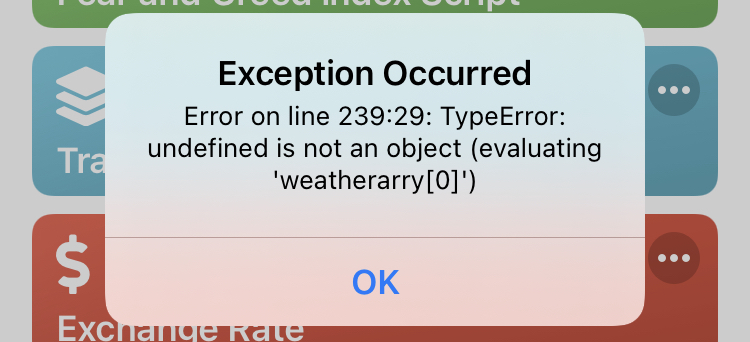

See line 97: let API_WEATHER = "" //get your key from openweathermap
The OP didn't put his API key in it. THAT will make it run, more likely.
Sign up for free
to join this conversation on GitHub.
Already have an account?
Sign in to comment