Skip to content

Instantly share code, notes, and snippets.

@andrewshell
Created December 7, 2022 04:27
Show Gist options
  • Select an option

  • Save andrewshell/8b57f96bf62a1dea9fa1a8137e13951a to your computer and use it in GitHub Desktop.

Select an option

Save andrewshell/8b57f96bf62a1dea9fa1a8137e13951a to your computer and use it in GitHub Desktop.
Debugging rssCloud on WordPress.com

I have a test application running at test.rsscloud.io on ports 80 and 9876.

The following code works:

curl --location --request POST 'https://brokenriverbooks.com/?rsscloud=notify' \
--header 'Content-Type: application/x-www-form-urlencoded' \
--data-urlencode 'domain=test.rsscloud.io' \
--data-urlencode 'port=80' \
--data-urlencode 'path=/feedupdated-s8759' \
--data-urlencode 'registerProcedure=' \
--data-urlencode 'protocol=http-post' \
--data-urlencode 'url1=https://brokenriverbooks.com/feed/'

However if you change the port to 9876 it fails. For some reason the rssCloud plugin seems unable to hit ports that are not 80.

@josephscott

Copy link
Copy Markdown

👋 Hi!

On the port front, I'm not inclined to change it. WordPress and the RSSCloud plugin have been working this way for more than 7 years.

The scheme issue seems to be new, or at least something that may have changed in the last 7 years. I'll unwind that code path more and see what falls out. The already suggested idea of defaulting to HTTP when no scheme is provided sounds like a reasonable way forward.

Separately, it looks like there are couple of spots in the plugin that need updating to run under PHP 8. I'll look into that closer and get an update out if needed.

@andrewshell

Copy link
Copy Markdown
Author

Thank you!

@scripting

Copy link
Copy Markdown

@josephscott — nice to see you here… long time. 🤪

@andysylvester

Copy link
Copy Markdown

Joseph, thanks for participating in this thread! I think that the WordPress-supported ports that Andrew Shell discovered (80, 443, or 8080) should be added to the WordPress.com support page (https://wordpress.com/support/rsscloud/) and the RSS Cloud plugin page (https://wordpress.org/plugins/rsscloud/). This information is useful for aggregator developers (currently, FeedLand (http://feedland.org/) by Dave Winer is not recognizing RSS Cloud support from WordPress.com feeds, probably due to the port issue).

@scripting

Copy link
Copy Markdown

@andysylvester — can you say simply what the issue is from FeedLand’s point of view?

@andysylvester

Copy link
Copy Markdown

Here are items from my debug session (https://andysylvester.com/2022/12/04/rss-cloud-support-in-wordpress-com-not-working/):

===

  1. Made a post (https://rsscloud4.wordpress.com/2022/12/04/test-post-007/) at 2:18 pm, no response to my test script.

  2. Checked in FeedLand for new item, did not see it until 2:28pm (10 minutes later). In testing of other tools creating RSS feeds with rssCloud support, the item would appear in FeedLand within a few seconds. I have noticed that feed readers seem to take up to 30 minutes to detect that there has been a change in a RSS feed from WordPress.com or WordPress.org sites.

@scripting

Copy link
Copy Markdown

@andysylvester -- i'm no closer to understanding why it not work. if you have that info, please share. thanks.

@andysylvester

Copy link
Copy Markdown

@scripting -- I think that when FeedLand attempts to register a WordPress.com RSS feed with the associated site, or to register a WordPress.org RSS feed with a site using the RSS Cloud plugin, the registration fails, and so the RSS feed updates in FeedLand for these sites occurs when FeedLand detects that the RSS feed has changed (I assume through the use of polling).

In the debug post I included in my earlier comment and in this gist thread, I have demonstrated how registration can fail for the RSS Cloud server in WordPress.com and WordPress.org sites. Since I can update feeds using Drummer/Old School and FeedLand's feeds (which are both using Andrew Shell's rssCloud server in the cloud element in the RSS feed) and see the response in FeedLand within seconds, this leads me to think that (1) WordPress.com and WordPress.org sites can only accept registration from scripts/applications on ports 80, 443, or 8080, and that FeedLand is not sending registration on those ports, so the registration fails and updated posts do not show up within seconds of the post going live, or (2) there is some problem in the FeedLand rssCloud implementation. Since FeedLand is really the only feed reader application that supports rssCloud (aside from the recent work by Colin Walker (scripting/reallysimple#11)), and I can demonstrate that two other feed generating tools appear to work correctly with FeedLand rssCloud functionality, I don't think (2) is the correct answer. I think (1) is the correct answer.

@scripting

Copy link
Copy Markdown

@andysylvester -- what i'm taking away from this is that when FeedLand attempts to register with WordPress it fails.

Also FeedLand is not the only aggregator that uses rssCloud. Don't make assumptions that you have no data for.

@scripting

Copy link
Copy Markdown

Let's start here.

http://feeder.scripting.com/returnjson?feedurl=https://unberkeley.wordpress.com/feed/

feeder.scripting.com is a web service that shows you exactly what FeedLand will get when it reads the feed.

As you can see the cloud element is on port 80.

If I understand correctly, this feed will work because WordPress is working properly as long as it's port 80.

Correct?

@andysylvester

Copy link
Copy Markdown

https://rsscloud4.wordpress.com/feed/ and https://rsscloud.andysylvester.com/feed/

The issue is not with the content of the cloud element. I think the issue is that the WordPress rssCloud server will not accept the notification URL from an application if it is not on ports 80, 443, or 8080.

@andysylvester

Copy link
Copy Markdown

I think it is poor form to make a comment asking for help in a negative way and then delete it (as the email thread from this gist shows). Please stand behind your words. I would like to work this out, but when you do things like that, I get the feeling you want it all "your way". Since you are the developer of FeedLand, only you can see what is happening in the app beyond the Javascript console. I have supplied a lot of data showing my investigation of the problems with the WordPress rssCloud implementation, but I can only investigate things from "the outside" for the most part.

@andysylvester

Copy link
Copy Markdown

@scripting -- you are correct, River5 also supports rssCloud. If you know of other aggregators that support rssCloud, I would be interested in testing them against this WordPress issue.

@scripting

Copy link
Copy Markdown

Andy please I'm just trying to figure out what's going on. I deleted the question because I thought of a much better simpler way to ask it.

@andrewshell

Copy link
Copy Markdown
Author

Steps I took:

  1. Have a new blog hosted on WordPress.com (ex https://andrewshell.wordpress.com/)
  2. Post a new blog post (ex https://andrewshell.wordpress.com/2022/12/09/test-post-1/)
  3. Add RSS feed of blog to FeedLand (By pressing "+ Feed" button, pasting URL, then OK)
    1. Example feed https://andrewshell.wordpress.com/feed/
  4. See the first blog post in FeedLand
  5. Add a new blog post (ex https://andrewshell.wordpress.com/2022/12/09/test-post-2/)

What I expect to see:

  1. Test post 2 should be listed in FeedLand shortly after posting it

What I saw:

  1. Test post 2 took about an hour to show up in FeedLand

@andysylvester

Copy link
Copy Markdown

Andrew, that result is consistent with my debug session (https://andysylvester.com/2022/12/04/rss-cloud-support-in-wordpress-com-not-working/). I did some experimenting with River 5 as a debug tool this afternoon. When I ran it on ports 443 and 8080, I was able to see the RSS Cloud plugin site update within a few seconds (https://rsscloud.andysylvester.com/). However the WordPress.com site did not update (https://rsscloud4.wordpress.com/feed/). I will add some test code tomorrow to look at the WordPress.com rssCloud server response. My suspicion is that WordPress.com sites need to have the notification URL on port 80, but I will check this tomorrow.

@scripting

Copy link
Copy Markdown

Andrew -- I'm looking into your report now.

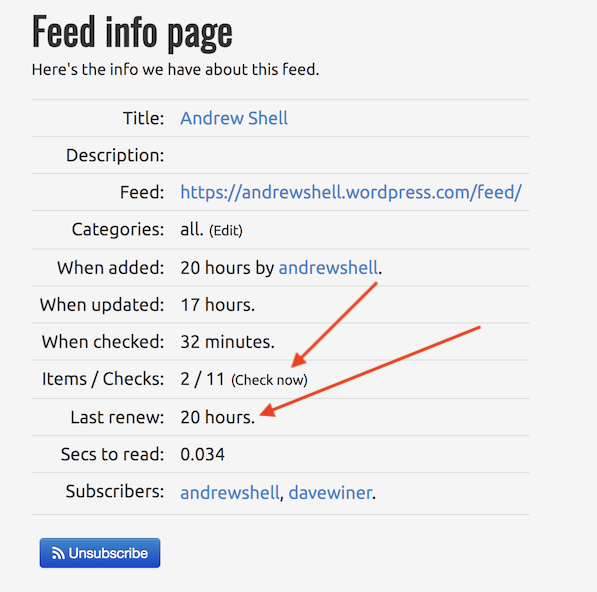
One tool you have to see how rssCloud is working re this feed is going to the Feed Info page for the feed.

http://feedland.org/?feedurl=https%3A%2F%2Fandrewshell.wordpress.com%2Ffeed%2F

The Last renew number is the last time FeedLand successfully renewed the notification request with the feed's cloud server.

At this time the number is 20 hours.

Just a piece of data.

You can also get FL to check the feed immediately, the conventional way by clicking on the Check Now link

A screen shot.

A report on my experiment in the next comment.

@scripting

scripting commented Dec 10, 2022

Copy link
Copy Markdown
  1. First, it's hard/impossible for me to step through this in the debugger because the local version of FeedLand that I use for testing is behind a firewall, and can't participate in rssCloud stuff. So I'm testing using the deployed server.

  2. I did find and fix an error. It was getting a 301 response, permanent redirect After fixing, the redirect is taking place.

  3. Another error shows up when renewing andrewshell.wordpress.com -- <notifyResult success='false' msg='No feed for url1.' />

going to look into this now

@scripting

Copy link
Copy Markdown

I added some debugging code, and had it display the request to the console before it sends it off to wordpress.com.

theRequest == {
    "url": "http://andrewshell.wordpress.com:80/?rsscloud=notify",
    "followAllRedirects": true,
    "maxRedirects": 5,
    "headers": {
        "Accept": "application/json"
    },
    "method": "POST",
    "form": {
        "port": "1670",
        "path": "/feedupdated",
        "url1": "https://andrewshell.wordpress.com/feed/",
        "protocol": "http-post"
    }
}

I think my next step is going to be to assume that it's the "form" that's tripping up the server? Couldn't hurt to use the default of body instead of form. This came up in recent work with the Mastodon API. Back in a bit...

@scripting

Copy link
Copy Markdown

BTW -- I see another problem. Every time feedland.js launches it might be assigned a different port.

This means that if it should crash and be relaunched, it might be assigned a different port when it is relaunched. Or when I install a new version as I am now doing every few minutes while I test this.

The upshot is that it will be sending notifications to the wrong port until the subscriptions are renewed within no more than 24 hours.

@scripting

Copy link
Copy Markdown

Another BTW -- this feature went in a few days before the product was feature frozen before release, and there was no one in the test group who had anything remotely like the experience Andrew has with rssCloud, so I did some simple testing and let it go, figuring at some point people who cared about rssCloud would show up and we'd do exactly what we're doing now. 😄

@andrewshell

Copy link
Copy Markdown
Author

Dave, we determined from our tests against the WordPress plugin that it only works if the aggregator is on ports 80, 443, or 8080 otherwise, it considers it an unsafe URL. So sending port 1670 shouldn't work.

@scripting

Copy link
Copy Markdown

Here's the new request.

{
    "url": "http://andrewshell.wordpress.com:80/?rsscloud=notify",
    "method": "POST",
    "followAllRedirects": true,
    "maxRedirects": 5,
    "headers": {
        "Content-Type": "application/x-www-form-urlencoded"
    },
    "body": "port=1670&path=%2Ffeedupdated&url1=https%3A%2F%2Fandrewshell.wordpress.com%2Ffeed%2F&protocol=http-post"
}

@scripting

scripting commented Dec 10, 2022

Copy link
Copy Markdown

And the wordpress server is responding, as before, with <notifyResult success='false' msg='No feed for url1.'>

At this point I don't see anything more I can do, it looks to me like the call is correct, and the error message seems to say it didn't find the URL in the request.

@andrewshell

Copy link
Copy Markdown
Author

I'll look to see if I can identify anything wrong with the request call. The one thing that I know won't work is using port 1670 because of the unsafe URL filter that had been discussed previously.

@scripting

Copy link
Copy Markdown

@andrewshell -- aha. okay that explains what's going on.

@josephscott and I worked out this protocol quite a few years ago and he may still be tuned in.

It's easy to imagine another piece of software putting different constraints on what port FeedLand can run on.

The odd thing is that feedland.org is as far as anyone outside the server is concerned running on port 80. I wonder what would happen if I just forced the port to be 80. Do you think they're calling me back by IP address or by a reverse DNS call or..?

I love this bullshit, it's fun (no sarcasm). 😄

@scripting

Copy link
Copy Markdown

Or force it to be 80 if the domain we're talking to is on wordpress.com! ;-)

Oh the humanity.

@scripting

Copy link
Copy Markdown

Also if that is the problem they surely could provide a better error message. I thought from the message they returned that it was a syntax error of some kind.

@andrewshell

Copy link
Copy Markdown
Author

Doing port 80 might work. I did notice that feedland doesn't seem to support the GET verification path (with challenge param) for pleaseNotify with the domain specified. (See http://walkthrough.rsscloud.co/#challengeParameter)

@scripting

Copy link
Copy Markdown

@andrewshell -- okay that goes on my todo list. :-)

i do have another project that i'm working on that i must move forward today, and i want to think about my next steps here, because i don't want to hack something in here, it has to be maintainable and documented, otherwise it's sure to break in a few months when i forgot what i did here. feedland is a very diverse piece of software and docs and maintainability are huge priorities.

andrew thanks for your help with this. i really enjoy working with you.

Sign up for free to join this conversation on GitHub. Already have an account? Sign in to comment