
-
-
Save fedegomez/7b4601e2cc9491e004189e9a23dd35b1 to your computer and use it in GitHub Desktop.
| javascript: (function (doc){var changed=0; function checkTitles(){console.log('jQuery version ', $.fn.jquery, ' loaded'); var position=1; var items=[]; var results=$('#rso .kp-blk .g, #rso .g[class="g"], #rso .srg .g').not('.kno-kp .g').find('div:first').find('a:first'); $('.title-changed, #CountTitlesChanged').remove(); results.each(function (){if (!$(this).parents('.related-question-pair').length){var parent=$(this).closest('.tF2Cxc').length > 0 ? $(this).closest('.tF2Cxc') : $(this).closest('li'); items.push([ position, $(this).find('h3').text(), encodeURI($(this).attr('href')), parent]); position++;}}); var numItems=1; cors_proxies=[ 'https://api.codetabs.com/v1/proxy?quest=', 'https://jsonp.afeld.me/?url=',]; items.forEach(item=>{$.ajax({url: cors_proxies[Math.floor(Math.random() * cors_proxies.length)] + item[2], success: function (data, status, xhr){title=$(data).filter('title').text(); var html='<div class="title-changed">'; if (title !=item[1]){html +='<span style="font-weight: bold;color: #ff6961;">' + title + '</span>'; changed++;}else{html +='<span style="font-weight: bold;color: darkgreen;">' + item[1] + '</span>';}html +='</div>'; item[3].find('div').first().append(html);}, error: function (xhr, status, error){var html='<div class="title-changed">'; html +='<span style="font-weight: bold;color: lightslategray;">Error: No se ha podido procesar la solicitud</span>'; html +='</div>'; item[3].find('div').first().append(html);}, complete: function (xhr, status){if (numItems==items.length){petitionCompleted();}else{numItems++;}}});});}function petitionCompleted(){$('#result-stats').append('<span id="CountTitlesChanged"> - ' + changed + ' títulos cambiados en esta página</span>');}if (typeof jQuery=='undefined'){var script_jQuery=document.createElement('script'); script_jQuery.src='https://code.jquery.com/jquery-latest.min.js'; script_jQuery.onload=checkTitles; doc.body.appendChild(script_jQuery); console.log('script_jQuery appended to body');}else{console.log('jQuery already included ...'); checkTitles();}})(document) |

fedegomez
commented
Aug 26, 2021


@fedegomez Kindly can you tell me how to install or configure it on the browser??
@fedegomez Kindly can you tell me how to install or configure it on the browser??
Just drag the code to the browser's bookmark bar, or create a new bookmark and paste the code in the URL field. Then when you do a search, just click on the bookmark and it will return the original titles.
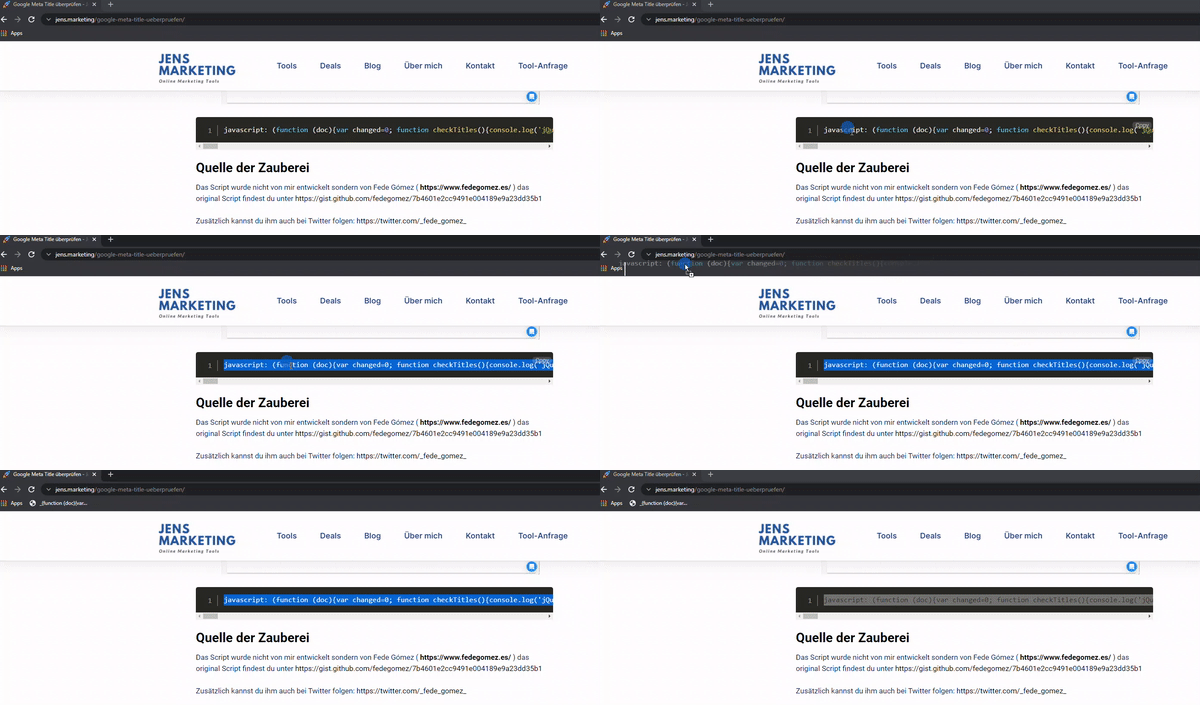
GIF by Jens Polomski
(https://jens.marketing/google-meta-title-ueberpruefen/)

Thank you, very useful, but still with some ugly bugs:


Hey Fede, really nice one!
Many thanks for sharing :-)

Si los sitios tienen protección por cloudflare no muestra el title "escrapeado" por lo demás funciona perfectamente!

Thanks for this tool, really helpful. 👏

Well done it will really help SEO professionals
Thanks for sharing it

Thanks For This

Hey, I am not getting the proper view, can some one suggest me what to do?
Only 1st one is proceed, no effect from 2nd result.
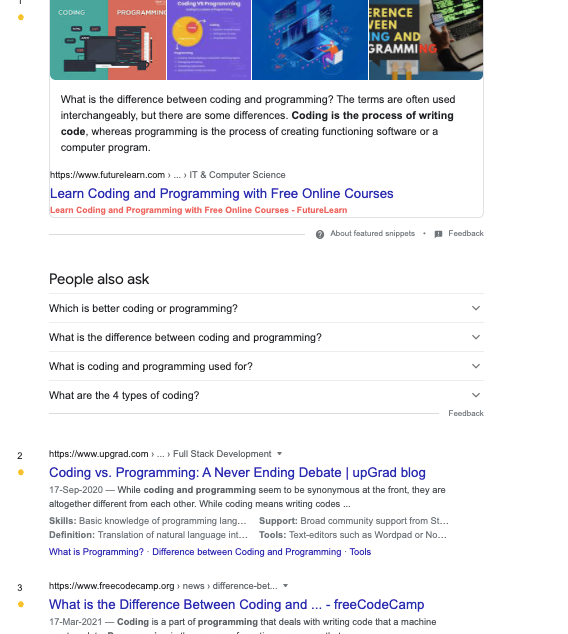

Thank you, very useful, but still with some ugly bugs:
The webiste you're showing in your screenshot is using the charset=iso-8859-1, as you can see in the source. If it were to use utf8, everything would be fine :) So I don't think it's a task for Fede to cope with this :)

How do i do this in safari on mac?

Fede, Gracias!!! 🙏🙌👏

Very nice tool. Can you tell, why some results gets these error?


@mikkellauge Read here: https://www.simply.com/dk/support/faq/php/36/ (in Danish). You have to deactivate your web host's Web Application Firewall.
Thanks @jaegermark :)

No conocia estos proxies que usas y me parece una idea genial para ir rapidito con javascript. Gracias @fedegomez

this code is not working on Mac, please help.

I can improve this code to work properly
better and faster
If interested: https://twitter.com/yehia_online

this is amazing, thanks @fedegomez - is there a chance of having one for meta descriptions as well? that'd be awesome, thanks!!

Hi, this is exactly what I have been looking for but can't seem to get it to work. I am on a Mac. I have added the code to the URL of the bookmark. I presume that I just do a google search for a keyword term and then press the bookmark? It would be amazing to get it working. Any help gratefully received.
Thanks
Danny

This script has stopped working. Yesterday I worked on windows.

This script is not working and no errors in the output. I am checking it on google chrome windows.

Hej! Could you be so kind to review your JS? Seems to be Google changed class names or smth. Your script was very very! useful for webmasters. Please, make it valid)))

Script stopped to work. Is there a Solution for this? Thanks